Friday, October 19, 2018
Woah. It's been a while.
What a long time. I've been busy in the community, conferences, twitter, and now with lots of partner work I've been neglecting the blog a bit. Plus I have three young kids :) I've always enjoyed blogging and wow did that time go fast since my last post. Of course lots of fun things have been going on behind the scenes so I'm going to start surfacing some of those leanings here again. More posts to come shortly!!

Thursday, June 2, 2016
Getting Started with Game Development
Game Dev - The Building Blocks
At the Microsoft //build 2016 conference this year we created some great labs for the attendees to work on. Being a lover of all things game dev related, I worked on the Introduction to Unity lab. To prepare you for that hands on with real game artwork/code, I recommend you get started with the Building Blocks: Game Development course (below) from Microsoft Virtual Academy to understand the foundations of game development with Unity.
This course covers topics from game objects & architecture to coding & animations and a bit of everything in between.
If you aren't sure where to start with game dev, this is the perfect bite sized intro course for you and best of all, it is free. The course runs about two hours and covers 8 sections. Check out the module listing with this icon in the player below.

Once you've finished up this course, be sure to check out the "Orks with Forks" lab we created which is the add-on content to this course. That video is at the bottom of this page.
Build 2016 Code Labs (The add-on to the above course) can be watched below with the code open-sourced over here.
Thursday, May 19, 2016
Xamarin & Microsoft - //Build Reactions
The.Time.Has.Come.

One of the most exciting announcements at //Build (if not _the_ most exciting) is that the long-rumored joining of forces has finally happened between Microsoft and Xamarin. You can read the details here, but in a nutshell it goes like this:
"Xamarin will be in every edition of Visual Studio, including the widely-available Visual Studio Community Edition, which is free for individual developers, open source projects, academic research, education, and small professional teams. Develop and publish native apps for iOS and Android with C# or F# from directly within Visual Studio with no limits on app size."
This is huge. I've spoken with developers in the last couple years or so that really wanted to use Xamarin but shied away because of the costs. Now it is free. The Xamarin SDKs are also now open source, so you can view each platform's SDK code until your heart is content.
Getting started is pretty simple but there are some requirements to be aware of. Building for iOS requires a Mac. Building for Android requires really...anything. Testing for either can be done on a PC with the new iOS Simulator James demos in the Channel 9 video below, which brings me to the next subject.
I had the pleasure of talking with James Montemagno from Xamarin for my relatively new Channel 9 blog Adam's Garage (ps - hit me up with any content you want to see). You'll be hard pressed to find a more passionate mobile developer than James and he demos how easy it is to create a new app and a couple sample applications. Watch the video inline, or jump on over watch it on Channel 9 and be sure to read the notes below the video there to see the various specific subjects and direct links.

One of the most exciting announcements at //Build (if not _the_ most exciting) is that the long-rumored joining of forces has finally happened between Microsoft and Xamarin. You can read the details here, but in a nutshell it goes like this:
"Xamarin will be in every edition of Visual Studio, including the widely-available Visual Studio Community Edition, which is free for individual developers, open source projects, academic research, education, and small professional teams. Develop and publish native apps for iOS and Android with C# or F# from directly within Visual Studio with no limits on app size."
This is huge. I've spoken with developers in the last couple years or so that really wanted to use Xamarin but shied away because of the costs. Now it is free. The Xamarin SDKs are also now open source, so you can view each platform's SDK code until your heart is content.
Getting started is pretty simple but there are some requirements to be aware of. Building for iOS requires a Mac. Building for Android requires really...anything. Testing for either can be done on a PC with the new iOS Simulator James demos in the Channel 9 video below, which brings me to the next subject.
I had the pleasure of talking with James Montemagno from Xamarin for my relatively new Channel 9 blog Adam's Garage (ps - hit me up with any content you want to see). You'll be hard pressed to find a more passionate mobile developer than James and he demos how easy it is to create a new app and a couple sample applications. Watch the video inline, or jump on over watch it on Channel 9 and be sure to read the notes below the video there to see the various specific subjects and direct links.
Where to next?
Get Visual Studio with Xamarin or install Xamarin into your existing Visual Studio instance. This url will allow you to do either. Once everything is setup, check out the following links for some great samples and further learning. Happy Coding :)Wednesday, April 13, 2016
Getting Started with the HoloLens
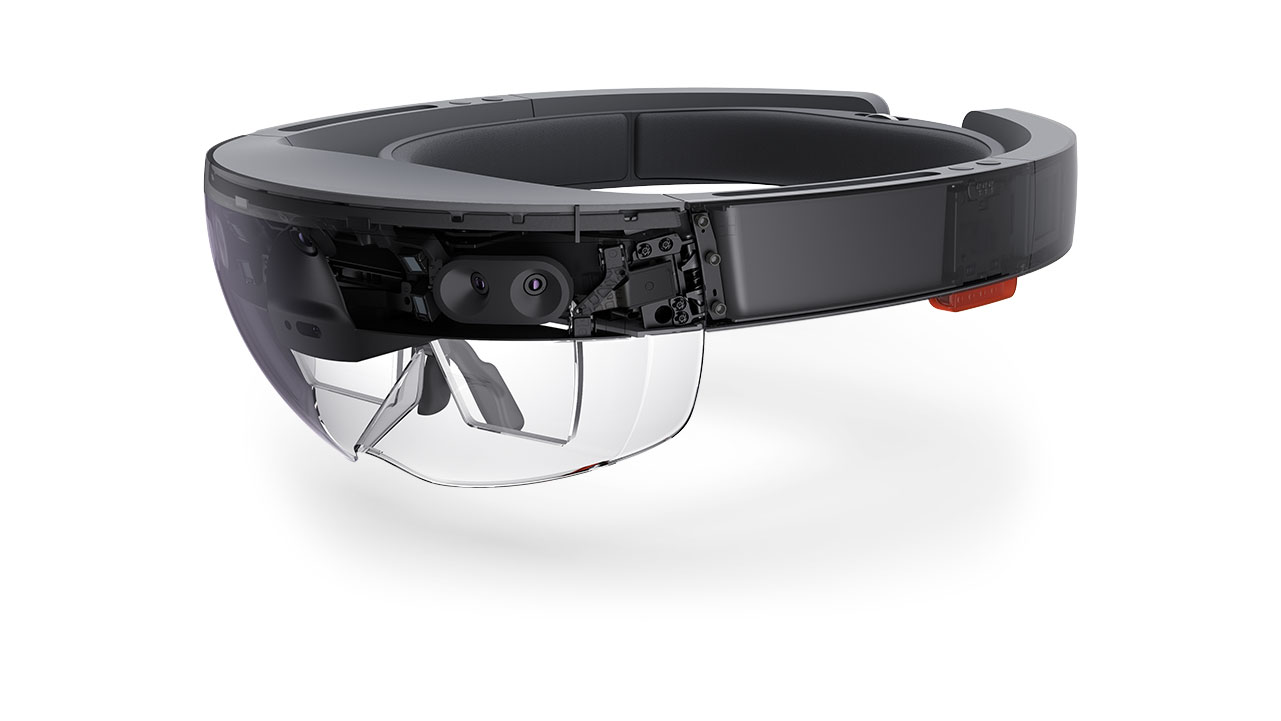
At Last
The HoloLens team has announced shipments have started. Unboxing videos are popping up everywhere. My Twitter and Facebook feed are yielding random posts of friends opening theirs. Unity has finally announced the availability of the free Unity bits that supports the HoloLens. <EvilLaugh>The world is mine... at last </EvilLaugh>Want a HoloLens? You can apply for a dev kit and still get going with development this very minute.
Alas, poor Adam, he has not a HoloLens and I'm assuming you don't either or you wouldn't be reading this - you'd be off exploring a galaxy or creating something in HoloStudio. But that's OK (for a short while anyways)! We don't need a HoloLens in our hands to be able to get started developing for one, just as you don't need a physical phone to start phone development. Yes, it's awesome to have one, yes the world is a better place when you deploy to a physical device - but we're developers. We can start developing now and not wait. Let's get to it!
Don't want to read? Watch the video!
Getting Started
We just need a few things to get started......
- Windows 10 Pro, Enterprise, or Education
- Unity 5.4 HoloLens Preview (Install the Editor and the UWP Runtime - two separate installs)
- Visual Studio 2015 Update 2 (Be sure you check off UWP Tools 1.2+ and Windows 10 SDK if you use a custom install)
- HoloLens Emulator
The above requirements are outlined here in more detail but I want to call one thing out. Your system must support Hyper-V or you can't run the emulator. Hyper-V is the virtualization system built into Windows, and is the reason you need Windows 10 Pro/Enterprise/Education and not Home Edition, as Home Edition doesn't support Hyper-V. If you are like me, you may run other software that uses Oracle VirtualBox (specifically Docker's Kitematic in my case) and I find myself switching Hyper-V on and off. If that fits you, there are various options to script out enabling/disabling Hyper-V.
It's all so new
That's true - it is all so new. This is brand new hot off the press API, bits, and documentation. As such you help the HoloLens folks and community out immensely by reporting anything in the HoloLens forums or asking any relevant questions there to help yourself out.To get started you have a handful of options
- Create a new HoloLens app from the templates in Visual Studio (installed with the Emulator)
- Create a new project in Unity and use for ex. the UnityEngine.VR.WSA namespace(s) to access HoloLens specific features
- Use the samples to get started from the Holographic Academy here
- Check out Galaxy Explorer
- Pour through the HoloLens documentation
There are a couple key concepts to be aware of. The first are the three pillars of Input on the HoloLens: Gaze, Gesture, and Voice. Gaze is what you are looking at (the device direction ie your head position, not your pupils). Gestures allow you to use your hand to interact with the Holograms and applications. Finally voice gives you access to the full Windows 10 speech engine.
Next is the spatial duo. Spatial sound (shameless self promotion alert - check out our //Build talk on Spatial Audio in UWP to understand more about what spatial audio is) and spatial mapping. Spatial audio is literally making audio sound as close to real life positioning as possible. Imagine being able to hear a sound above you or behind you, even though you don't have any speakers above you or behind you (just on the side of your ears). That my friends, is the magic of spatial audio.
Spatial Mapping is my favorite feature of the HoloLens which allows it to do some pretty neat things. Imagine dropping a hologram like a ball onto a real life table and it stays exactly where you dropped it. Now imagine you move the table fast out of the way and the ball now drops to the real floor and stops. This happens because the HoloLens is actually aware of its surroundings - it performs spatial mapping as shown in the image here. This works so well you can drop a hologram onto something, leave the room and come back later and it's still in the same place.

It's all UWP
We can create a UWP app from the templates in Visual Studio or we can create a new project in Unity and export to Visual Studio as a Direct3D or XAML UWP application. It's just a Visual Studio Solution, so we can open it up and deploy it to a device or an emulator.Keep in mind you can make near any Universal Windows Platform application run on the HoloLens. This is the power of UWP. You can run two different App Views on the HoloLens. In a 2D View, multiple apps from the Windows Store can run and you can pin them all around your environment (for ex to your walls). These would be 'flat' ie 2D apps. Secondly, you can run an app in a holographic view. The holographic view is when you have an app that will be drawing holograms. In this holographic view, no other app can run.
To make UWP apps for the Hololens, as mentioned you can use Visual Studio and the code templates for the HoloLens, or Unity.
But I Don't Know Unity!
That OK. We have plenty of Unity learning resources available outside of the amazing content on Unity's learning site as well such as our video courses on Microsoft Virtual Academy- Build Blocks Game Development (**brand new quick start to go with GitHub lab below**)
- Building Windows 10 Games with Unity 5
- Developing 2D & 3D Games with Unity for Windows Jump Start
and our recent GitHub based Unity Workshops from //Build are great for hour long quick starts
Easy Peasy
Getting up and running is pretty straightforward. Next - let your creative juices flow and make some awesome experiences. One thing for you hard-core folks that love lower level information, read all about Hologram stability.

Lastly, don't forget to tell the HoloLens Twitter Account about your cool projects! Happy Hacking :)
Wednesday, December 16, 2015
Understanding ASP.NET 5 and .NET Core
**Update - New ASP.NET 5 video coming soon, follow me on Twitter to keep an eye on announcements **
Most of my enterprise career was web based. In around 1997 my first major web project was to create the sign-up 3.5" floppy disks that were distributed with a good amount of Bell Atlantic phone books. This used all sorts of c-based cgi, Python scripts, and a mish mosh of tech. Things were so very very different then. We were actually the very first all Windows NT Internet Service Provider in the country. Good times but was web tech surely in its infancy.
When ASP (Active Server Pages) first came out, it was amazing - it so we thought at the time as we spaghetti coded away our scripts. Fast forward nearly 20 years to ASP.NET 5. A technology that shares only letters with its predecessor. It's unbelievably fast. It runs an entirely different model than any of its predecessors. It is cross platform - even running on Linux and OSX. This is indeed a new Microsoft.
What is ASP.NET 5?
ASP.NET 5 is a new version of ASP.NET that has been built from the ground up with performance in mind, it is modular, and supports multiple platforms such as Windows, OSX, and Linux. ASP.NET 5 no longer contains Web Forms, it is purely MVC based and supports both C# and VB.NET. This may be a difficult point for some. Going forward, there was a lot of baggage Web Forms carried around and it was an abstraction to the web, which isn't how most modern frameworks work. As such, MVC 6 is the only supported option in ASP.NET 5. You can however still create Web Forms apps in Visual Studio 2015 (for ex. on .NET 4.6), just not for ASP.NET 5.
The WebAPI technology (that released back with MVC 4) has now been merged into a unified controller model in ASP.NET 5. ASP.NET 5 now has out of the box support for Dependency Injection without the need for any third party DI containers (although several major ones work with it if that's your use case), and performance that can meet or exceed NodeJS applications. Let's not forget self hosting (running without installing into a web server) as well across all the supported platforms and of course you can host in IIS. You can be up and running self-hosting a RESTful api in minutes, publish to Azure and support millions of users, or host in your web server.
ASP.NET 5 has a modular design so you only run the components that you need in your application. Prior versions of ASP.NET had significant overhead loading libraries that may have never been used. The memory footprint of ASP.NET 5 is significantly smaller and you can truly run your application now side by side with multiple versions of .NET and your application code.
As stated in the docs website
- New light-weight and modular HTTP request pipeline
- Ability to host on IIS or self-host in your own process
- Built on .NET Core, which supports true side-by-side app versioning
- Ships entirely as NuGet packages
- Integrated support for creating and using NuGet packages
- Single aligned web stack for Web UI and Web APIs
- Cloud-ready environment-based configuration
- Built-in support for dependency injection
- New tooling that simplifies modern web development
- Build and run cross-platform ASP.NET apps on Windows, Mac and Linux
- Open source and community focused
ASP.NET 5 is now RC (Release Candidate) which means you will get support for it in production - although expect some further changes.
What does ASP.NET 5 run on?
ASP.NET 5 runs on Windows, OSX, Linux, and even Docker containers. It loads under .NET 4.5+, .NET 4.6, Mono, and .NET Core (more on that later).
As a side note, there are some interesting future changes brewing here in determining what defines the .NET system your app will run on, and that is the .NET Platform Standard which defines a minimum set of base classes required to run your app.This is something to keep an eye on as it changes how our apps will refer to .NET to run.
Getting Started
First you need the bits for ASP.NET 5 which you can retrieve from http://get.asp.net. You can use all of your favorite code editors to create ASP.NET 5 applications. My preference is Visual Studio 2015 or Visual Studio Code as it has all the tooling to understand your apps better, but it's fairly trivial to do this with Sublime, Notepad, Brackets, etc.
Next create an application. You have a couple options here. The first is in Visual Studio, do a File-New Project->Web, select ASP.NET Web Application. This launches then a new dialog where you could select the .NET 4.6.1 template for One ASP.NET (IE using MVC, Web API, and Web Forms all in one project) which I want to stress is not ASP.NET 5. You must select one of the ASP.NET 5 projects from the ASP.NET 5 section (makes sense, right?).


Yeoman

If you like using Yeoman (no idea what Yeoman is? Check out our free video here on Microsoft Virtual Academy) you can use Yeoman generator for ASP.NET 5. This will code-gen your base project for you. The commands (assuming you have NPM installed by installing NodeJS) are simply:
npm install -g yo
npm install -g generator-aspnet
yo aspnet
That will generate your project and you can simply right click on that generated folder and open in Visual Studio Code to see your entire project. There's actually a great article on this Visual Studio Code ASP.NET 5 workflow already, so I won't repeat that here.

Project.json and the Three Commands
There are three commands used in managing your ASP.NET 5 project. Either you execute them from the command line or your IDE like Visual Studio executes them for you. I like to understand what is going on behind the scenes so lets dive into that a little bit.DNVM - This is the .NET Version Manager. It is this utilities job to install the run times for your ASP.NET 5 app to use. You can have multiple runtime versions at the same time.
DNX - Your ASP.NET 5 apps are launched via the DNX executable. DNX is the host for _all_ of your ASP.NET 5 applications - be it a console app or running inside of IIS. Even if it's transparent to you, behind the scenes DNX is running your application. If you remember this, life will be easier. DNX is the bootstrapper, compilation system, utilities, and more for running ASP.NET 5 on a variety of runtime versions like .NET 4.5.1, .NET 4.6, .NET Core, and Mono.
If we look at the Startup.cs class generated in a File->New Project template we can see the following Configure method:
// This method gets called by the runtime. Use this method to configure the HTTP request pipeline.
public void Configure(IApplicationBuilder app, IHostingEnvironment env, ILoggerFactory loggerFactory)
{
    loggerFactory.AddConsole(Configuration.GetSection("Logging"));
    loggerFactory.AddDebug();

    if (env.IsDevelopment())
    {
        app.UseBrowserLink();
        app.UseDeveloperExceptionPage();
        app.UseDatabaseErrorPage();
    }
    //..
}
The DNX runtime actually is responsible for injecting IApplicationBuild, IHostingEnvironment, and ILoggerFactory into your application. You are communicating with DNX here. This is quite different than we've been used to with standard .NET applications.
DNX does really has four layers to its execution
1. Boot the CLR for the version you have specified or default ie full .NET, CoreCLR etc.
2. Create the LoaderContainer and IL Loaders (those resolve your assemblies)
3. Resolve assemblies in project.json and call the entry point in your managed code
4. Your application code executes
As you can tell by now, DNX is the most important executable in this process.
DNU - .NET Utilities. Yea - it's a generic name but think of this as your multi-tool to install packages (ie NuGet), build your app, or publish your app. There is no packages.config in your ASP.NET 5 projects, only the project.json.
The project.json file is the most important file in your project. It defines the runtime version that will need to run your application. It also specifies dependencies for your applications - IE NuGet packages that will need to be restored before your project runs for the first time.
Let's check out a portion of a project.json file with only the portions I want to discuss here shown below. The dependencies section are NuGet packages that your application depends on. Visual Studio will automatically restore these for you.
{
  "dependencies": {
    "Microsoft.AspNet.Diagnostics": "1.0.0-rc1-final",
    "Microsoft.AspNet.IISPlatformHandler": "1.0.0-rc1-final",
    "Microsoft.AspNet.Mvc": "6.0.0-rc1-final",
    "Microsoft.AspNet.Mvc.TagHelpers": "6.0.0-rc1-final",
    "Microsoft.AspNet.Server.Kestrel": "1.0.0-rc1-final",
    "Microsoft.AspNet.StaticFiles": "1.0.0-rc1-final",
    "Microsoft.AspNet.Tooling.Razor": "1.0.0-rc1-final",
    "Microsoft.Extensions.Configuration.FileProviderExtensions" : "1.0.0-rc1-final",
    "Microsoft.Extensions.Configuration.Json": "1.0.0-rc1-final",
    "Microsoft.Extensions.Logging": "1.0.0-rc1-final",
    "Microsoft.Extensions.Logging.Console": "1.0.0-rc1-final",
    "Microsoft.Extensions.Logging.Debug": "1.0.0-rc1-final"
},

  "commands": {
    "web": "Microsoft.AspNet.Server.Kestrel"
  },

  "frameworks": {
    "dnx451":{},

    "dnxcore50": {}
  }
}
Visual Studio Code will also prompt you to restore these packages.
Behind the scenes, both VS & VS Code are simply using the command:
dnu restore
This command pulls in the packages from the NuGet source, which just pulls them down from the NuGet servers and caches them locally under for ex. c:\users\
If you are using the command line (what both of the prior options use behind the scenes) you simply can run dnu restore in your project root folder.
I want to stress that these commands will happen automatically in Visual Studio when you create/run your project. You only need to know these commands if you want to work at the command line, for ex. if you are working on Linux.
Running your application happens via several methods. Publishing I'll cover in a future post. From Visual Studio simply click on the IIS Express button and it will have already configured IIS Express to support this via an HttpPlatformHandler, which is a back-end module that launches processes that listen on HTTP Ports and proxies requests to them in IIS. This will make more sense in a second.
Running your application happens via several methods. Publishing I'll cover in a future post. From Visual Studio simply click on the IIS Express button and it will have already configured IIS Express to support this via an HttpPlatformHandler, which is a back-end module that launches processes that listen on HTTP Ports and proxies requests to them in IIS. This will make more sense in a second.

See those other options above that say 'web' and 'ef'? Those are commands. Commands are somemthing brand new to ASP.NET 5, they are simply a way to have multiple ways to load your application or perform actions on it. In the above example, we can run in IIS Express. If we click 'web' then this is going to launch Kestrel (still through DNX though) to act as a lighweight web server to run your app. If we want to generate code for Entity Framework to create our database for us we can use the 'ef' command to call into Entity Framework's Code-First Migrations for ASP.NET 5. BTW - if you have no idea about the power of EF Code-First Migrations, check out our free Microsoft Virtual Academy course on Entity Framework - specifically Module 4.
What is going on behind the scenes when all this happens? Its pretty simple.
dnx web
That's it :) If the command was named 'MyWebServer' instead of 'web' then of course it would be dnx mywebserver.
What is .NET Core?
.NET Core is a new lightweight open source .NET that is comprised of two components, CoreCLR which is essentially the runtime, and CoreFX which is the additional libraries like IO, Collections, etc that you would use in your applications. The major difference here is it is a pull mechanism. You start with a very lightweight framework and bring in the modules you need via NuGet packages. This is how the ASP.NET 5 templates are setup out of the box.

You can run ASP.NET 5 on the full .NET framework. There's baggage there though. Many extra libraries are loaded that you likely don't need.
Looking back to the project.json file you can see the frameworks element. This will define what supported frameworks this app will run on. Here we see dnx451 (ie DNX support for the FULL .NET Framework 4.5.1) and dnxcore50 - the lightweight version.

You have the ability to launch from Visual Studio and specify the default framework to load against by going into your project properties

In reading up on .NET Core you'll find several ways of running this that are exclusive of each other. There's a dotnet utility if you want to compile or run a .NET Core app (the command line interface supports other operations as well) available at https://github.com/dotnet/cli. When it comes to ASP.NET 5 though, the .NET Core bits are loaded via the DNX utility. DNX allows you to specify which runtime you are launching the app with via:
dnx --framework dnx451 web
You have the flexibility to choose which framework you are going to run on. Marc Gravell from Stack Overflow fame has a good series on moving on over to DNX called The Road to DNX as there are definite API changes if you've been used to developing on Full .NET (ex .NET 4.5) and moving to .NET Core.
Serving Up Content
ASP.NET 5 is decoupled from a web server implementation. DNX runs out of process and currently has support for IIS and the open source Kestrel web server. Previously the WebListener was an option, but that has been removed for RC as the move is towards using Kestrel to self-host. If you are running cross platform, the nginx web server/proxy can be used to proxy requests on over to Kestrel, just like the HttpPlatformHandler does for IIS. to be clear, IIS hosts DNX (through the HttpPlatformHandler), just as Kestrel hosts DNX as well. See the image below, note how in each case Kestrel is the host to listen to HTTP traffic on. The web server simply proxies traffic to it, whether its IIS or NGinx.
We talked about the project.json file which is a change from past versions of MVC, but it is also important to note that ASP.NET 5 projects will serve up static content by default only from the wwwroot folder. Views and Controllers work in much the same manner they did previously (if you are not familiar with that, I'll be posting a video shortly on this process).
Wrapping up
There's much more to go into, this was a high level overview of what differences ASP.NET 5 bring to the table. Stay tuned for some more posts on the lower level details, process execution / hosting, and more.Follow me Twitter to keep an eye on updates, I try to post only useful stuff :)
Enjoy!
Thursday, December 10, 2015
Visual Studio Tools for Apache Cordova - A Developers Overview
TL;DR; If you know JavaScript & HTML and want to write cross platform mobile apps that can utilize native device features (contacts, images, geolocation, etc) with a single codebase for iOS, Android, and Windows - Visual Studio Tools for Apache Cordova will enable you to do this. You can also remote debug from Visual Studio to iOS and on Android devices. We also have an Android Emulator for PC, a MacOS one coming out, and the ability to update your apps dynamically after users have already installed them - outside of the 'wait for the to approve updates' process.
The nitty and the gritty
There's some tooling available that will make your life way easier in developing cross platform mobile apps. But first, let's start in the beginning...
What is Apache Cordova?
Apache Cordova (previously PhoneGap - although that is now Adobe's productized version of Cordova) in short is an open source technology that allows you to create package an HTML/JavaScript application and allow JavaScript code to access native features (literally - any native feature) like contacts, battery level, accelerometer, images, and more on a device - again, from JavaScript.
For example, to access the battery level on the phone you could simply use this code after you install the battery plugin (more on that below). This code would then work on Android, iOS, Windows Phone, BlackBerry, and more
For example, to access the battery level on the phone you could simply use this code after you install the battery plugin (more on that below). This code would then work on Android, iOS, Windows Phone, BlackBerry, and more
window.addEventListener("batterystatus", onBatteryStatus, false);

function onBatteryStatus(info) {
    // Handle the online event
    console.log("Level: " + info.level + " isPlugged: " + info.isPlugged);
}
There are a lot of pieces you normally would have to install to get this all working. Like - 13 separate installs. The team at Microsoft has worked with the Apache Cordova team to ensure a seamless experience in Visual Studio.
Where does Visual Studio fit in?
Visual Studio is the development environment for nearly anything on the Microsoft platform. If you've been developing for a while, chances are you've heard of it if not used it. The thing is though - for many years it was just to integrate with Microsoft technology. That is no longer the case. You can build an Android app with it. You can even create an iOS app with Visual Studio using what we're going over here, or with the Xamarin support in Visual Studio, or even using Visual Studio to compile Objective-C for Windows. Today I'll show you how to create a cross platform app and debug it on Android. First you'll need some bits though.
Installing the bits
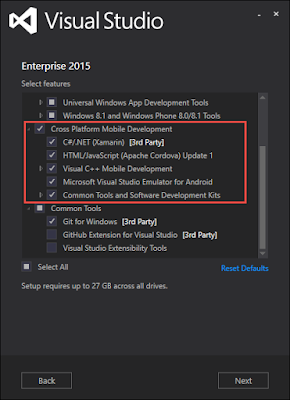
All you You need any Visual Studio 2013 or Visual Studio 2015 installation. Ideally though you want Visual Studio 2015 because the entire third party multi-install process is done for you. You can install Visual Studio Community for free here. During installation, ensure you check off the "Cross Platform Mobile Development" options. If you already have Visual Studio installed, you'll just simply need to run the setup again and select those options to add them on top of your installation. If you want to see the details of that, check out Install Visual Studio Tools for Apache Cordova

Creating an app with a native feel
One of the past criticisms of a Cordova/PhoneGap application is that it didn't 'feel' native. There are multiple ways around this perceived issue. Believe it or not, it is typically not a performance issue, but instead an issue of look and navigation. Android has a particular way it navigates between pages, iOS has another, Windows yet another, and they all have completely different looking icons in their apps. Take this example - which icons are from which OS? Clearly they have the same purpose but they show up differently. Differences as minor as this can be picked up by users.
Our modern day advantage though is we can use hardware accelerated transitions and native looking icons easily inside of a Cordova application. Enter in the ionic framework and ionic icons. These two free projects from Ionic give your apps a native feel plus plenty of other features. Ionic has put together a template to use in Visual Studio that is a great starting point with Angular, multiple views, transistions, data binding, and of course an Apache Cordova template inside of Visual Studio. To use it, simply do File->New Project, click Online (on the left navigation) and search for the Ionic template as shown here and double click on it to install. The template install is a one time operation, you don't need to do this every project.

Then you simply just create a new project with that template

The first thing you'll want to do is ensure your project is updated to the latest Apache Cordova CLI (used to build your app) version by opening the config.xml. Visual Studio will give you a nice UI to edit this file, but you can just as easily right click on it and "Edit Code" to manually edit it as there are additional items in this file the UI doesn't show you (like iOS icon and splash screen information). If you don't have the latest version you may not see plugins available made using the latest version.

I updated my version to 5.1.1 as that was the latest tested version as of this writing as noted here. Upon the next build of the project, the tooling will automatically grab the latest version and tel you about it in your build output
------ Installing Cordova tools cordova@5.1.1 for project from npm.
Project Structure
Once the project is created notice that the structure is pretty basic. The /merges folder contains files that will be added to your project only for a platform specific build - for example anything in /merges/android will be pulled into the project for an android build. If it exists in the /www folder it will be overwritten, otherwise just added to the project. The /plugins folder contains platform specific plugins (covered a tad more below), the /res folder contains platform specific resources, like Windows icons, iOS icons, and Android icons. Finally the /www folder contains all of your content like a website would, including the initial index.html which is the start page as noted in config.xml (which also contains things like the app name and description).

Plugins
If I want access to the battery information as in the prior JavaScript code, I need a plugin that someone wrote to do that. A plugin contains all the native code for each platform that is included during compilation for that platform. You can simply install the plugin and use the code posted at the beginning of the article. You can write your own plugins as well to do virtually anything on the native side from JavaScript. To add a plugin just open config.xml and find a plugin
You can always see the installation and build details in the output window in Visual Studio so there's no mystery as to what is going on, as most of the installs use Node Package Manager (NPM).

Once the plugin installs, note that there is native code for each and every supported platform. Here I've highlighted the iOS, Android, and Windows code that exists for the battery plugin. That code will be used during the compilation for any particular platform. Windows has already setup the Android tooling (and Windows of course) so when I run on a device, it is actually compiling that native code into the final build accessible by JavaScript. Plugins are cool - admit it :)

Running and debugging
You thankfully have many options when running your application. You can tell Visual Studio to deploy and run your app- on a Windows device
- on an Android device
- in the fast and free Android emulator that we made for PC
- on iOS or iOS emulator via the Remote Agent for iOS
- in the Ripple browser based emulator (I love this thing)
I just want to take a moment to highlight our Android emulator. Geez - did I just say that? Yes - I write cross platform apps and games (and I own six PCs, a MacBook Pro, four Androids, three iPhones, and 8 Windows Phones) so need to test on various devices. Our Android emulator is fast. Visual Studio installs it (provided you checked it off during the install) and you can install APKs into it and test them. The tooling we're talking about today does it all automatically.
There is a new fast Android Emulator coming out for the Mac as well for free. Your options today are to use Google's (which is purely software based and slow), or pay for a premium one. We are releasing a free one. You can find details of that on the Visual Studio Emulator for Android page.
Ok - so I plugged in my Android Note 4, ensured my build was selected for Android (#1 below) and then clicked the Play button (#2 below) and the APK was auto-created, deployed to my phone, the app launched on my phone, and I was debugging it from Visual Studio and hitting breakpoints I setup in my code (just click any line of code on the left hand column and code execution will stop when it gets to that line). The same works for Windows of course, and the same works for running inside the emulator and also on iOS (via the Remote agent for iOS mentioned above).


Here's a screenshot from my phone. Note that several images are missing. Which ones are they? Why are they missing? In this case my urls are incorrect and yielding a 404, Visual Studio will show you

If I wanted to run this not on a device but instead in the Ripple emulator which runs in the browser, we can just choose one of the Ripple options (and Windows or iOS or Android on the left).

Launching this now shows up in the Chrome. You'll note on the left and right hand side we can select various options like geolocation, forcing the battery level, etc. Hence, this is an emulator to make your app think a location is a certain area, you are running on a particular device, and more. Just keep in mind this isn't a virtual environment, it is a lightweight emulator.

Updating applications after installation
As with any software, the challenge comes into play when to update the app on the user's device. You have several solutions here depending on the type of app you have- Deploy a new version of the app to the store and wait for the user to update it
- Wrap an existing website so content is served up live in your app
- Have your own custom update process in place
- Use Code Push to dynamically update application content in-place
The first four are self explanatory. The last one though, Code Push, is a free service from Microsoft that is being developed specifically for this purpose. You use a couple command line operations and configure your project, and voila - you are ready for dynamic live updates on your deployed apps. You can find out more on the github project page.
But I'm a modern web developer and use Gulp/Grunt/Bower/NPM!
No problem! Visual Studio understands all of the above and you can implement any of those modern web technologies into the project and you can run your Gulp tasks, restore packages, etc. If you are unfamiliar with the above mentioned tools, check out my MSDN Magazine articles on Modern Web Development to get a quick start on them. In short though bower.json, package.json, gruntfile.js, and gulpfile.js are all understood by Visual Studio and can run your tasks (or not - your choice) and manage your package installations and restores inside your Visual Studio Tools for Apache Cordova application.
MMMMMmmm Tacos.
TACO, besides being the most delicious perfect food on the planet, is the Tools for Apache Cordova. This is a set of cross platform command line tools to generate Cordova apps. This is a separate code base than what was described above for Visual Studio and meant for those folks that love the command line. The following code would install TACO, create an app, and launch it a browser.
#install taco command line interface
npm install -g taco-cli
#create the app
taco create MyApp
cd MyApp
#launch in chrome (you could use ios or android instead of browser too!)
taco platform add browser
taco run browser
Open Source
The Apache Cordova project is open source. Visual Studio is not open source, but we do have Visual Studio Code, a cross-platform code editor that has recently been open sourced and includes extension support. Tooling is being worked on to be able to develop (including Intellisense) and debug your Cordova applications! You can get notified when this releases here and check out the video below.Wrapping up
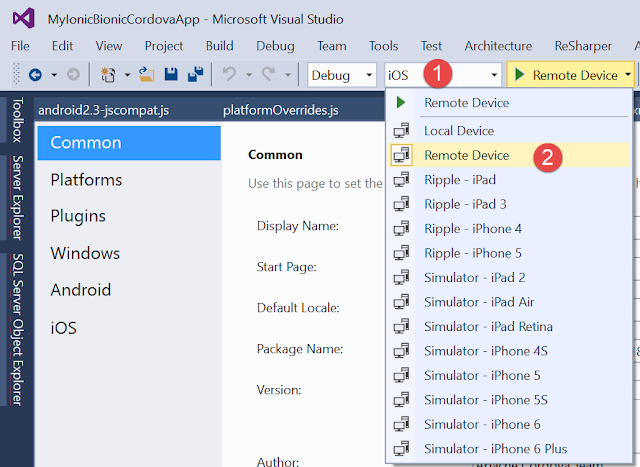
Visual Studio will generate your Windows executables, Windows Store packages, and also your Android APKs simply by using the Build menu in Visual Studio. Your iOS appplications need to be built on a Mac using a physical Mac or a service like Mac-In-Cloud, although I've simply installed the remote agent on my MacBook and did an iOS / Remote Device in the platform dropdowns and built/debugged from my MacBook to Visual Studio.
Either create a new template from scratch or check out the Ionic template mentioned earlier or the SAP Fiori template, a pretty full featured app template that you can find here. There are so many additional things to write about that are useful. A common use case is to store data in a database from your apps. There's a great blog post about using Azure DocumentDB here from any JavaScript powered application.

What's Next
Either create a new template from scratch or check out the Ionic template mentioned earlier or the SAP Fiori template, a pretty full featured app template that you can find here. There are so many additional things to write about that are useful. A common use case is to store data in a database from your apps. There's a great blog post about using Azure DocumentDB here from any JavaScript powered application.
Visit the Visual Studio Tools for Apache Cordova team online - they do live sessions and Q/A!
https://twitter.com/VSCordovaTools
http://taco.visualstudio.com/en-us/docs/get-started-vs-tools-apache-cordova/
http://taco.visualstudio.com/en-us/docs/get-started-vs-tools-apache-cordova/
Enjoy :)
Wednesday, December 2, 2015
Introduction to Visual Studio Dev Essentials - Dev Tools and Services for Everyone
TL;DR; Enroll here to get free stuff to dev on any platform for any type of developer - all from one portal
At Microsoft, I work with a lot of developer types. Cross Platform developers, web developers, app developers, game developers, and more. One of the challenges I see is in just getting the various tools and services a developer needs to do a task. They are never in one place. Take Apache Cordova. It's an awesome tech for cross platform development but there's like 12 different installs to get a complete tool set. This extends across every developer type. Enter in Visual Studio Dev Essentials.
Visual Studio Dev Essentials is a program and portal that gives you access to software, services, free training from industry leaders on virtually any tech, and priority support.

PS - If you don't develop for Microsoft Tech, that's OK - read below for how this can help you on other tech. Our dev tools are some of the best on the planet for other tech too - like any web developer, Node.js, Python, Android, and cross platform development with Apache Cordova and Xamarin.
If you use Microsoft Technologies, you likely already know a lot of the above and are probably happy right now seeing it all on one place with extra free offerings. What about those that don't use our tech?

HockeyApp - The name may be misleading. Hockey you say? Nope. Even better (and I like Hockey). This service provides cross platform beta distribution, crash logging, and live real user feedback capturing in your app for - get this - Android, iOS, OSX, Windows, Unity, and Xamarin. There's also mobile dev-ops and team management to round out an enticing service for near any app dev. You may have heard of TestFlight, which killed Android support over a year ago. No worries there's a solution for all platforms - try HockeyApp!
Visual Studio Tools for Apache Cordova - I cannot stress how well this tech can work for cross platform app developers. If you've heard of PhoneGap.

Azure also has cool features to deploy web apps like
If using VS with Bower, NPM. Grunt, or Gulp piques your interested, check out my recent MSDN articles on using Bower, Grunt, and Gulp integrated right into Visual Studio
Visual Studio - Bower: Modern Tools for Web Development
Modern Tools for Web Development: Grunt and Gulp
Hopefully something caught your eye as we really have something for near every developer type - even if Microsoft isn't your development platform (like using Visual Studio Code on OSX!).
If you haven't yet - head right on over to enroll for free now.
Any questions? Reach out to me @AdamTuliper
At Microsoft, I work with a lot of developer types. Cross Platform developers, web developers, app developers, game developers, and more. One of the challenges I see is in just getting the various tools and services a developer needs to do a task. They are never in one place. Take Apache Cordova. It's an awesome tech for cross platform development but there's like 12 different installs to get a complete tool set. This extends across every developer type. Enter in Visual Studio Dev Essentials.
Visual Studio Dev Essentials is a program and portal that gives you access to software, services, free training from industry leaders on virtually any tech, and priority support.
Who can benefit?
If you touch any of these techs, then yes - you. It's free.- iOS
- Android
- Node.js
- Python
- Windows (Raspberry Pi, Phone, Desktop, Server, HoloLens, XBox, SurfaceHub, Laptop, Data)
- IoT (Internet of Things)
- Data Scientist - Machine Learning
- Web (HTML, JavaScript, PHP, ASP.NET, ie all of you web devs)
- Anyone doing cross platform development either writing native apps or Apache Cordova apps
Free Software
- Visual Studio Community Edition
- Visual Studio Code
- Windows VM for Windows Universal Development for 60 days
- Parallels & Parallels Access - 90 day trial (only 14 on their site)
PS - If you don't develop for Microsoft Tech, that's OK - read below for how this can help you on other tech. Our dev tools are some of the best on the planet for other tech too - like any web developer, Node.js, Python, Android, and cross platform development with Apache Cordova and Xamarin.
Free Services
- Visual Studio Team Services for five users (exclusive)
- App Service Free Tier- Backend data and auth services for mobile and web (used by NBC, 3M and even used for the Super Bowl)
- HockeyApp Free Tier (Haven't heard of this? Cross platform beta/feedback/crash reporting - more below though!)
- Coming Soon - Azure $25 Credit (exclusive)
- There are presently many free Azure services available too
Free Learning
- Pluralsight for three months (if you activated by Dec 31st its 6 months while supplies last)
- PS ever hear of codeschool.com or digital-tutors.com? They are all part of Pluralsight
- HackHands $25 credit with expert live help for coding via video conf and screenshare
- Psps This is also a Pluralsight company :)
- Xamarin University (coming very soon) - Classes and Certification for one of the best cross-platform technologies on the planet
- WintellectNOW for three months
- Priority support in MSDN Forums
- No community reply after 48 hours? A Microsoft Engineer will address
If you use Microsoft Technologies, you likely already know a lot of the above and are probably happy right now seeing it all on one place with extra free offerings. What about those that don't use our tech?
Highlights for devs that don't use Microsoft Tech
We have the IMHO best Android emulator around for Windows. Available as part of Visual Studio or a direct download. We use our own virtualization technology built into Windows to deliver performance that can be faster than being on an Android device. Python developers can benefit from Visual Studio to develop and remote debug Python scripts even on on MacOS & Linux.
Microsoft or not - Cross Platform Developers

HockeyApp - The name may be misleading. Hockey you say? Nope. Even better (and I like Hockey). This service provides cross platform beta distribution, crash logging, and live real user feedback capturing in your app for - get this - Android, iOS, OSX, Windows, Unity, and Xamarin. There's also mobile dev-ops and team management to round out an enticing service for near any app dev. You may have heard of TestFlight, which killed Android support over a year ago. No worries there's a solution for all platforms - try HockeyApp!
Visual Studio Tools for Apache Cordova - I cannot stress how well this tech can work for cross platform app developers. If you've heard of PhoneGap.
The Good Web Peoples

Are you one of those old school but well learned web developers that don't like change or do you classify yourself as a new renegade developer that likes to change frameworks three times in a project because its new and compelling - or maybe brand new to web development? No problem either way. Visual Studio and Azure can help any of your projects get done faster and with fewer bugs. How so? Oh...
- IDE integration with any JavaScript library
- Integrated support for Grunt, Gulp, NPN, and Bower
- Live JavaScript Debugging
- Integrated GIT support
- Live Cloud debugging on Azure (yes - a cloud deployed web app can be debugged locally)
- Ps on a mildly related note, ever check out vorlon.js for remote JavaScript debugging?
Azure also has cool features to deploy web apps like
- Automatic deploy when you commit to GitHub
- DropBox deployment
- Data storage/retrieval from any web app with about three lines of code (including script reference!)
- Multi platform push notifications (iOS, Android, Windows)
- Integrate automatically with many providers like Twitter, Facebook, Office 365, SalesForce, Dynamics, OneDrive, Box, DropBox, Twilio, Facebook, Marketo, and more
If using VS with Bower, NPM. Grunt, or Gulp piques your interested, check out my recent MSDN articles on using Bower, Grunt, and Gulp integrated right into Visual Studio
Visual Studio - Bower: Modern Tools for Web Development
Modern Tools for Web Development: Grunt and Gulp
Go. For. It.
Understand some of these services are available piecemeal. For example I can get Visual Studio 2015 Community by direct download. What's the catch then? Why use this? The advantage here is you have much more available - exclusive offers, but it also combines everything you need in one place so you don't have to go searching for the tools and services. It is a complete offering for your development.
Hopefully something caught your eye as we really have something for near every developer type - even if Microsoft isn't your development platform (like using Visual Studio Code on OSX!).
If you haven't yet - head right on over to enroll for free now.
Any questions? Reach out to me @AdamTuliper
Subscribe to:
Posts (Atom)